Revolutionizing WordPress with AI
We are witnessing a turning point in web development. AI Website Builders is rapidly evolving from a novelty to a necessity, particularly in the WordPress ecosystem. As the most widely used Content Management System (CMS), WordPress offers unmatched flexibility. However, its steep learning curve often deters beginners and slows down professionals. AI-powered website builders have emerged as a solution to this problem, and their integration into the WordPress workflow is revolutionizing how websites are created, customized, and managed.
As you work your way through the CMS’s learning curve, it gets easier. It’s interesting to consider how many people give up before they get to that stage, though.
There might be a solution in technology. AI-driven website builders are beginning to appear on the market. By providing answers to a few questions, they hope to make website development simpler for non-developers.
They might sound like yet another DIY tool attempt, possibly a substitute for web designers. At first glance, this makes sense. However, some long-standing obstacles to WordPress use may be removed by AI. If so, they might be helpful to both experts and beginners.
The Challenges of Setting Up WordPress for Beginners
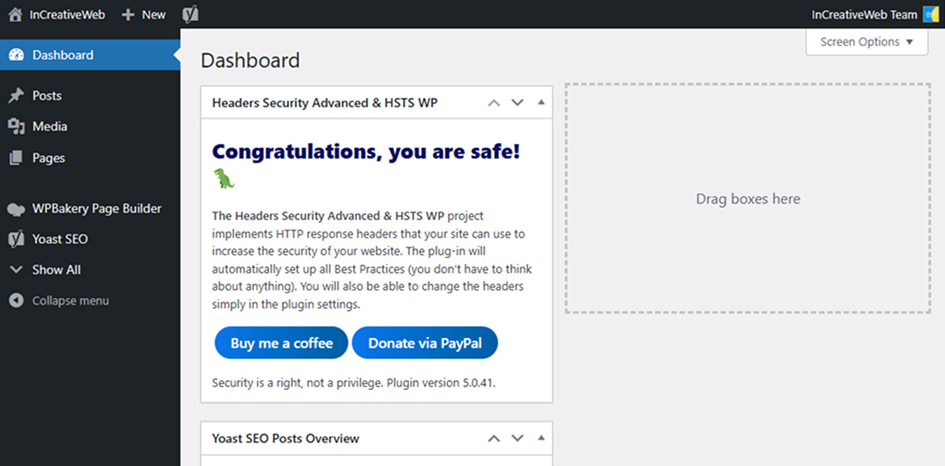
We should first identify the issue that needs to be resolved before delving into AI’s potential to assist WordPress users. When you first log into WordPress, it’s like being abandoned in the middle of nowhere.
A substantial menu can be found on the sidebar, and a welcome message can be found at the top of the dashboard. A curious user will follow both to explore. The sheer volume of options, though, might overwhelm some.
Additionally, they must be at least somewhat knowledgeable about the following WordPress features:
- Where to install plugins and themes.
- How to modify their theme using the Customizer (classic themes) or Site Editor (block themes).
- How to create pages and posts using the Block Editor.
- Any site configurations that require modification.
- Security and performance best practices.
Read more: Top 5 Content Management Systems for Developers in 2025
WordPress requires dedication to learn. People are not led down that path by the default onboarding process.
Moreover, it is a burden for web developers. A lot of repetitive work goes into setting up a new website, and we also have to teach clients how to use the software. All in all, we spend a lot of time on activities other than site development.
A better onboarding process could have a huge impact.
How Artificial Intelligence May Enhance User Experience
An AI website builder is, in general, an onboarding tool. Its goal is to ascertain the requirements of your website and generate content that is pertinent. These tools have produced a range of outcomes thus far.
Serving a variety of niches offers potential. The builders of the present generation are more likely to target non-developers who wish to create a website quickly and affordably. They are a one-size-fits-all solution.
Think about the amount of time we spend preparing to create a website. We could save time and money by using the appropriate tool to complete these tasks. Numerous tasks on our to-do list could be completed with a straightforward text prompt.
AI is already developing into a number of subfields. We have business, education, and coding-trained models. This trend is followed by adding tools for agencies and independent contractors.
However, there is also more potential for tools designed for non-developers. They might suggest plugins (or groups of them) based on user input or industry. AI may be able to generate color and typographic schemes with the aid of uploaded logos.
These tools can also be used for purposes other than the initial site build. AI may also assist users in learning how to produce and organize content. From the Learn WordPress archives, a tool might offer advice and pertinent material. They could carry out regular inspections to maintain WordPress’s highest level of security.
These actions aren’t always carried out by AI website builders nowadays. But service providers will see that there is more they can do. It will help to have a little imagination.
A Chance to Enhance WordPress for Everyone
The word “site builder” might make you squirm. We won’t hold it against you because these tools have a patchy record of poor quality and questionable worth. Also, they are not targeting web professionals.
With more AI-powered products going online, that might change. For instance, the self-hosted (WordPress.org) version is said to include a tool that was recently released by WordPress.com. Numerous intriguing applications could be created for such an open-source program.
It may soon be possible to reverse the concept of a site-building tool. In addition to increasing web developers’ productivity, it has the potential to resolve one of the most annoying parts of learning WordPress.
Conclusion
AI website builders are reshaping how users approach WordPress development by automating design, speeding up content creation, and streamlining customization. Whether you’re a beginner or a seasoned developer, AI tools offer smarter workflows, reduced manual effort, and better performance insights. As these platforms evolve, they’ll make building WordPress sites faster, easier, and more accessible-helping users focus more on creativity and user experience than technical complexity.
Ready to simplify WordPress development?
At InCreativeWeb, we specialize in delivering fast, scalable, and modern WordPress solutions tailored to your business goals. From custom themes to AI-powered site builders, we streamline your digital presence with innovation and precision. Our team ensures seamless user experience, optimized performance, and ongoing support for your WordPress site. We integrate the latest technologies, including AI, to accelerate development and boost your online success. Get in touch with our WordPress experts today to build your next-gen website with confidence.
FAQs
1. What is an AI website builder?
An AI website builder is a tool that uses artificial intelligence to automate the website creation process, including design, layout, and content generation.
2. Can AI builders fully replace traditional WordPress development?
Not entirely. While AI simplifies many tasks, custom functionality, complex integrations, and advanced design still require human input.
3. How do AI tools help in WordPress design?
AI tools can generate themes, suggest layouts, optimize images, write content, and even recommend SEO improvements-making design faster and more intuitive.
4. Are AI site builders good for beginners using WordPress?
Yes, they’re especially useful for beginners who want to build websites quickly without deep technical knowledge or coding skills.
5. What are the limitations of AI website builders?
Limitations include reduced flexibility, fewer customization options, and reliance on predefined templates or algorithms that may not suit complex needs.
6. Do AI builders work with existing WordPress themes and plugins?
Some AI tools integrate well with popular themes and plugins, while others work best when building a site from scratch within their ecosystem.
7. Are AI website builders safe to use with WordPress?
Yes, as long as you’re using reputable tools and plugins. Always check for security updates and compatibility with your current WordPress setup.
8. Which AI builders are best for WordPress users in 2025?
Popular AI builders include Elementor AI, Wix ADI (for hybrid platforms), 10Web, and Hostinger’s AI Website Builder-all offering WordPress-compatible solutions.
Author
Jayesh Patel
Jayesh Patel is a Professional Web Developer & Designer and the Founder of InCreativeWeb.
As a highly Creative Web/Graphic/UI Designer - Front End / PHP / WordPress / Shopify Developer, with 14+ years of experience, he also provide complete solution from SEO to Digital Marketing. The passion he has for his work, his dedication, and ability to make quick, decisive decisions set him apart from the rest.
His first priority is to create a website with Complete SEO + Speed Up + WordPress Security Code of standards.