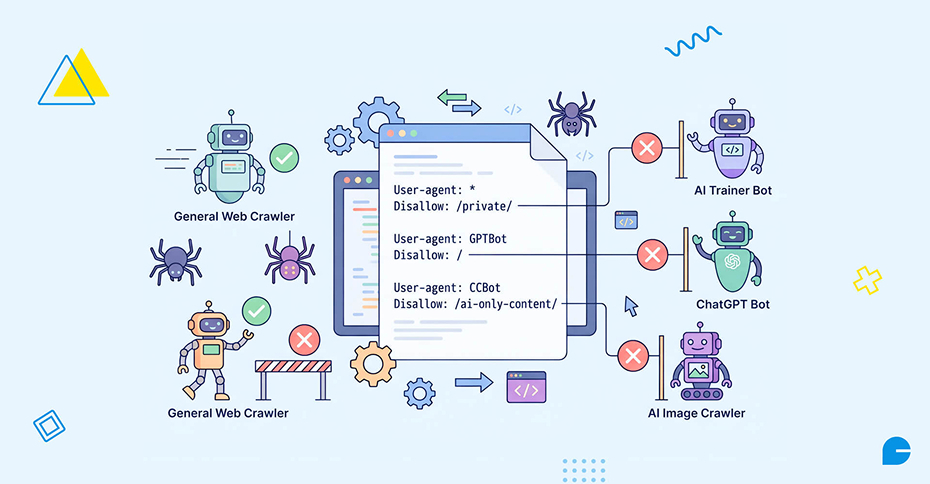
Robots.txt is a plain text file at your domain root (yoursite.com/robots.txt) that tells web crawlers which parts of your site they may access. In 2026, it also controls a new category of visitor: AI crawlers. These bots fall into two groups with two completely different jobs – search/citation crawlers (like OAI-SearchBot, Claude-SearchBot, and PerplexityBot) fetch your pages so AI engines can cite you in live answers, while training crawlers (like GPTBot, ClaudeBot, and CCBot) fetch your pages to train the underlying model. You can allow one and block the other with separate rules in the same file. Block the wrong bot, and you can disappear entirely from an AI engine’s answers, even while ranking normally in Google.
If you want your content to show up in ChatGPT Search, Perplexity, Google AI Overviews, or Copilot, robots.txt is the first gate those answers pass through. Get it wrong, and no amount of good content will save you, the crawler never even reaches the page.
What Robots.txt Actually Does
Robots.txt has run the web’s crawler traffic for over two decades. A few fundamentals still apply, AI bots included:
- It lives at the root of your domain – https://yoursite.com/robots.txt – and nowhere else.
- It’s made up of groups, each starting with one or more User-agent lines followed by Allow or Disallow rules.
- It is opt-out, not opt-in. No file, or an empty file, means “crawl everything.” You only need rules for what you want to restrict.
- Two wildcards work inside paths: * matches any sequence of characters, and $ anchors the end of a path (so Disallow: /*.pdf$ blocks every PDF on the site).
- A Sitemap: line can point crawlers to your sitemap and sits outside any group.
This structure follows the Robots Exclusion Protocol standard maintained by the IETF, which is the closest thing the web has to an official spec for how robots.txt should be written and interpreted. That much hasn’t changed. What’s new is the list of user-agents worth naming individually.
The Mistake That Makes Sites Invisible to AI Engines
Most robots.txt problems in 2026 come down to one misunderstanding: treating “AI crawler” as a single category.
It isn’t. Every major AI company runs at least two separate bots:
- A training crawler, which harvests pages to feed into future model training runs.
- A search or citation crawler, which fetches pages in real time so the AI engine can quote or link you in an answer.
These are governed by separate User-agent rules. Allowing or blocking one has no effect on the other. That distinction matters because a lot of sites added a blanket “block AI” rule to their robots.txt a couple of years ago – usually named after whichever bot was in the news, without realizing it also cut off the citation crawler for that same engine. The result: the content is fine, the SEO is fine, and the site still never appears in that engine’s answers, because the crawler that would fetch it for citation was never allowed in.
You can, and often should, treat these as independent decisions: keep your content out of model training while staying fully eligible to be cited in AI search.

AI Crawler Reference Table
Here’s the current list of user-agents worth naming explicitly in your robots.txt, what each one does, and how to treat it depending on your goal.
| Bot |
Company |
Job |
Allow if you want… |
| OAI-SearchBot |
OpenAI |
Powers ChatGPT Search citations |
To be cited in ChatGPT |
| GPTBot |
OpenAI |
Model training |
Your content used in training data |
| ChatGPT-User |
OpenAI |
Fetches a page when a user asks ChatGPT to browse it live |
ChatGPT to open your page on request (note: OpenAI states robots.txt rules may not reliably apply to this agent) |
| PerplexityBot |
Perplexity |
Indexes pages for Perplexity’s AI search |
To be cited in Perplexity |
| ClaudeBot |
Anthropic |
Training crawler |
Your content used in training data |
| Claude-SearchBot |
Anthropic |
Indexes pages for Claude’s search/answer features |
To be cited in Claude |
| Claude-User |
Anthropic |
Fetches a page for a live, user-initiated request |
Claude to browse to your page on request |
| Google-Extended |
Google |
Controls use of your content for Gemini and AI Overviews training |
To appear in Gemini/AI Overviews (blocking it does not affect normal Google Search ranking) |
| Bingbot |
Microsoft |
Standard Bing index, which also powers Copilot |
Visibility in Copilot and Bing |
| CCBot |
Common Crawl |
Open dataset used to train many third-party models |
Broad, uncredited reuse of your content in training sets (most site owners block this) |
| Bytespider |
ByteDance |
Crawls for TikTok/ByteDance AI products |
Has a history of weak robots.txt compliance, treat as untrusted regardless of the rule you set |
| Amazonbot, FacebookBot, cohere-ai, Diffbot, Omgilibot, ImagesiftBot |
Various |
Assorted AI/data-collection crawlers |
Case-by-case, generally low priority |
The two rows that trip people up most: GPTBot vs. OAI-SearchBot, and ClaudeBot vs. Claude-SearchBot. Same company, same “AI” label in casual conversation, entirely different jobs.
Related Reading: AI Discovery Explained: How to Prepare Your Website for AI Search
How Robots.txt Matching Actually Works
Before writing rules, it helps to know how a crawler decides which ones apply to it. Three rules govern this, and getting them wrong is how well-intentioned configs backfire.
- A crawler follows exactly one group – the most specific match. If you have a User-agent: GPTBot group and a User-agent: * group, GPTBot follows only its own group and ignores the wildcard group completely. It does not inherit anything from *. So if you write a GPTBot group that blocks one path, you must also repeat any general rules you want GPTBot to follow, it won’t pick them up from elsewhere in the file.
- Within a group, the longest matching rule wins – not the first one written. For a path like /api/public/data, if you have both Disallow: /api/ and Allow: /api/public/, the second rule is longer and wins, so the path is allowed. Order in the file doesn’t decide it; specificity does.
- No matching rule means the path is allowed. Because robots.txt is opt-out by default, anything you haven’t explicitly restricted is fair game to any crawler.
If you want to sanity-check a live file, paste it into a robots.txt testing tool, Google’s own robots.txt report in Search Console is a reliable option, and check a few real paths against a few real user-agents before publishing.
Two Ready-to-Use Robots.txt Templates
Template A – Allow AI citations, block AI training
Use this if you want to appear in ChatGPT, Perplexity, Claude, and Google AI Overviews, while keeping your content out of raw model training sets where possible.
# Allow AI search/citation crawlers
User-agent: OAI-SearchBot
Allow: /
User-agent: PerplexityBot
Allow: /
User-agent: Claude-SearchBot
Allow: /
User-agent: Bingbot
Allow: /
# Block AI training crawlers
User-agent: GPTBot
Disallow: /
User-agent: ClaudeBot
Disallow: /
User-agent: Google-Extended
Disallow: /
User-agent: CCBot
Disallow: /
User-agent: Bytespider
Disallow: /
# Everyone else
User-agent: *
Allow: /
Sitemap: https://yoursite.com/sitemap.xml
Template B – Block all AI crawlers, training and search alike
Use this only if you’re comfortable losing visibility in AI-generated answers entirely – for example, on a site where you don’t want any automated summarization of your content.
User-agent: GPTBot
Disallow: /
User-agent: OAI-SearchBot
Disallow: /
User-agent: ClaudeBot
Disallow: /
User-agent: Claude-SearchBot
Disallow: /
User-agent: PerplexityBot
Disallow: /
User-agent: Google-Extended
Disallow: /
User-agent: CCBot
Disallow: /
User-agent: Bytespider
Disallow: /
User-agent: *
Allow: /
Sitemap: https://yoursite.com/sitemap.xml
Replace yoursite.com with your actual domain, and adjust each group to match your policy. There’s no setting that lets you be cited by an AI engine without allowing its search crawler, if visibility is the goal, that crawler has to stay on Allow: /.
The Silent Mistakes That Block You Even With a “Correct” Robots.txt
Robots.txt is necessary but not sufficient. Even a perfectly written file won’t help if any of the following are also true:
- noindex or nosnippet tags on pages you want quoted. If a page can’t produce a snippet in regular search, it generally can’t be surfaced in an AI Overview either.
- Heavy client-side rendering. If your content only appears after JavaScript runs, many crawlers – AI bots included – never see it. This is a common, invisible failure point on modern single-page apps. Server-render or pre-render anything you want crawled.
- CDN or firewall-level blocking. Some bot-protection services block AI crawlers by default at the network layer, which overrides whatever your robots.txt says. If you’re allowed on paper but still absent from AI answers, check your CDN or WAF settings first.
- No sitemap submitted to Bing Webmaster Tools. Both ChatGPT and Copilot lean partly on Bing’s index, so a stale or missing Bing sitemap can quietly limit citation reach even when robots.txt is correct.
Robots.txt Isn’t Enforcement – It’s a Request
It’s worth being clear-eyed about what robots.txt actually is: a convention, not an access control mechanism. There’s no technical enforcement behind it. The file states your policy; each crawler decides on its own whether to honor it.
Crawlers from major, reputable AI companies generally do respect robots.txt for their named, documented bots. User-initiated agents are a partial exception – OpenAI’s own bot documentation notes that robots.txt rules may not reliably apply to ChatGPT-User, since that bot is triggered by a live user request rather than autonomous crawling. Some less cooperative crawlers, historically including Bytespider, have been caught ignoring the file or using undeclared user-agent strings altogether.
If you need actual, enforced blocking rather than a polite request, that happens at the network layer, user-agent filtering, rate limiting, or a bot-management toggle on your CDN (Cloudflare and similar providers can block AI crawlers by verified IP range rather than relying on the self-reported user-agent string). And remember robots.txt is a public file: a Disallow: /internal-docs/ line tells everyone, human or bot, exactly where to look, it’s a signpost, not a lock.
How to Audit Your Current Robots.txt in 5 Minutes
- Open yoursite.com/robots.txt directly and scan for Disallow rules under any of the search/citation crawlers in the table above (OAI-SearchBot, Claude-SearchBot, PerplexityBot, Bingbot). If one is disallowed, that’s very likely why you’re absent from that engine’s answers.
- Run your top queries through ChatGPT, Perplexity, and Google in a logged-out browser. If you rank normally in organic search but are never cited, suspect crawl access before anything else.
- Check your CDN or WAF dashboard (Cloudflare and similar) for an “AI bot” or “scraper protection” toggle. These are sometimes on by default and silently override an otherwise-correct robots.txt file.
Also Read: Are Meta Descriptions Still Worth Writing in 2026?
Should You Also Add an llms.txt File?
You’ll see this recommended alongside robots.txt updates. It’s harmless to add, but as of now there’s no solid, public evidence that major AI engines use llms.txt for ranking or citation decisions. Treat it as optional and low-priority. The things that demonstrably affect AI visibility are crawler access via robots.txt, clean page structure, server-rendered content, and clear sourcing – that’s where the effort is best spent first.
FAQs
1. If I block GPTBot, will ChatGPT stop citing me?
No. GPTBot handles training, not citations. ChatGPT Search citations come through the separate OAI-SearchBot user-agent. You can block training and keep search access open at the same time.
2. I blocked AI bots a while ago – is that why I’m not showing up in AI answers?
Very possibly. Audit your robots.txt for Disallow rules targeting any search/citation crawler (not just training bots). This is one of the most common, and most overlooked, reasons a site is missing from AI-generated answers.
3. Does allowing AI crawlers hurt my regular SEO or Google ranking?
No. These are AI-specific user-agents, separate from Googlebot. Allowing them doesn’t change how Googlebot crawls or ranks your site – Google-Extended, for example, only governs Gemini/AI Overviews training data, not search ranking.
4. Can I block AI training but still appear in Google AI Overviews?
Largely yes. Blocking Google-Extended affects Gemini and AI Overviews training use specifically, without touching your normal Google Search visibility, though it may limit how your content is used to generate certain AI-driven summaries. For citation-style appearances, keeping standard Googlebot and Bingbot access open matters most.
5. Is robots.txt enough to guarantee AI bots stay out?
No. It’s a voluntary convention that reputable, documented crawlers generally follow, but there’s no technical enforcement. If you need guaranteed blocking, use network-level tools – CDN/WAF bot management, IP filtering, or rate limiting, in addition to robots.txt.
6. Should I add llms.txt too?
You can, but don’t expect much impact yet – there’s no clear evidence it affects ranking or citation in major engines currently. Prioritize robots.txt, crawlable rendering, and content structure first.
Conclusion
Robots.txt used to be a one-time setup you forgot about. In 2026, it’s a live switch that decides whether ChatGPT, Perplexity, Claude, and Google’s AI Overviews can even see your pages, let alone cite them. The fix isn’t complicated, name your search/citation crawlers explicitly, decide separately how you feel about training crawlers, and check that nothing else (noindex tags, JS-only rendering, a CDN bot-blocker) is quietly undoing your work. Most sites that are missing from AI answers aren’t missing because of bad content. They’re missing because a crawler was never let in the door.
Need Help Getting Your Site AI-Search Ready?
Getting cited in AI Overviews takes more than one text file. It also depends on how your site renders, how it’s indexed, and how it’s structured technically, all things a generic checklist can’t fix for you.
At InCreativeWeb, we help businesses get their websites AI-search and GEO ready as part of our web development and SEO work:
- SEO Services, technical SEO audits, robots.txt and crawlability fixes, and content structuring built to earn citations in AI Overviews, ChatGPT, and Perplexity, not just rank on page one.
- Web Development, building sites that are server-rendered and crawlable from day one, so this isn’t a fix you need to bolt on later.
Author
Jayesh Patel
Jayesh Patel is a Professional Web Developer & Designer and the Founder of InCreativeWeb.
As a highly Creative Web/Graphic/UI Designer - Front End / PHP / WordPress / Shopify Developer, with 14+ years of experience, he also provide complete solution from SEO to Digital Marketing. The passion he has for his work, his dedication, and ability to make quick, decisive decisions set him apart from the rest.
His first priority is to create a website with Complete SEO + Speed Up + WordPress Security Code of standards.