WordPress 7.1 launched on August 19, 2026, and it’s one of the most practical releases in recent years. Instead of one headline feature, it delivers a long list of fixes and upgrades that touch how teams collaborate, how content gets styled, how media is handled, and how developers build for the platform.
Here’s what’s new, who benefits, and what to check before you hit update.
What Is WordPress 7.1?
WordPress 7.1 is the second major WordPress release of 2026, timed to coincide with WordCamp US. Rather than one flagship feature, it focuses on collaboration, styling, and media management, while closing out a long list of smaller usability issues that both beginners and agencies have asked for. Whether you manage a single blog or a large multi-author publication, the changes affect daily editorial and admin work.
What’s New in WordPress 7.1?
WordPress 7.1 introduces responsive block styling without custom CSS, an upgraded Notes system with @mentions and email notifications, shareable revision links, two new blocks (Tabs and Playlist), a redesigned image/media editor, client-side media processing for faster uploads and lower server load, and a major expansion of the Abilities API that helps AI agents and tools interact with WordPress sites more safely. The admin toolbar is now persistent across the Post and Site Editors, and support for HEIC, AVIF, and UltraHDR image formats is built in.
WordPress 7.1 Features at a Glance
| Feature |
Who It’s For |
What It Solves |
| Upgraded Notes (@mentions, email alerts) |
Editorial teams, agencies |
Feedback loops without leaving WordPress |
| Shareable revision links |
Content teams |
Easier review and change tracking |
| Responsive styling in the editor |
Owners, designers |
Mobile-specific styles without custom CSS |
| Hover/focus state styling |
Designers |
Interactive styling without a CSS snippet |
| New Tabs block |
Content editors |
FAQs, specs, and comparisons without plugins |
| New Playlist block |
Podcasters, musicians, educators |
Native audio playlists with no extra plugin |
| New Media Editor modal |
All users |
Better cropping, rotating, and metadata editing |
| Client-side media processing |
Developers, hosts |
Lower server load, faster uploads |
| Abilities API expansion |
Developers |
Safer, more structured AI agent integrations |
| Persistent admin toolbar |
All users |
Consistent navigation while editing |
WordPress 7.1 Features for Website Owners & Content Teams
1. Upgraded Notes With @Mentions and Email Alerts
Notes, introduced in WordPress 6.9 as a lightweight commenting tool – now function as a genuine editorial feedback system. You can type @ inside a note to tag a specific collaborator, and WordPress sends that person an email notification linking straight back to the post. Notes can now also be attached to a specific sentence or phrase instead of an entire block, support basic text formatting (bold, italics, links, emoji), allow multiple discussion threads per block, and collapse automatically when they run long. Because Notes are stored as a private comment type, they no longer appear in your public comment feeds.
Why it matters: Multi-author blogs and agencies no longer need a separate tool like Slack or Google Docs comments just to review a draft.
2. Shareable Revision Links
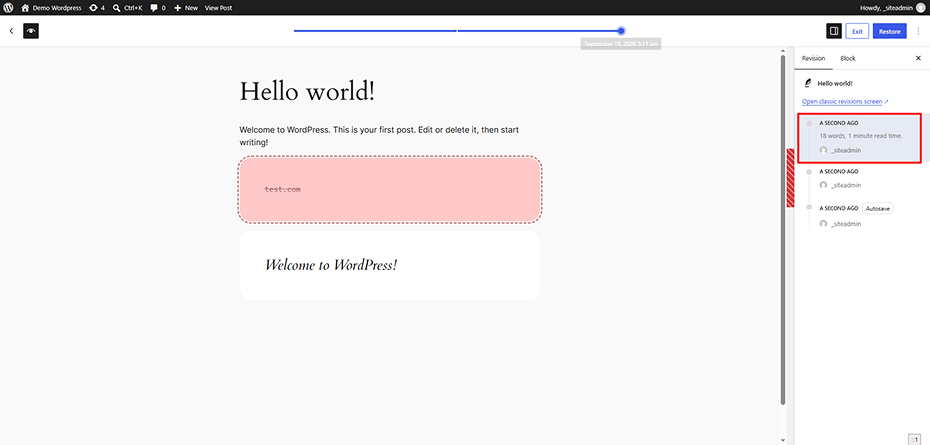
Visual revisions, introduced in WordPress 7.0, now let you copy a direct link to any specific version of a post. Anyone who opens that link sees the exact revision with changes highlighted – useful for client approvals, editorial sign-off, or showing a teammate exactly what changed.
3. WordPress 7.1 Responsive Styling
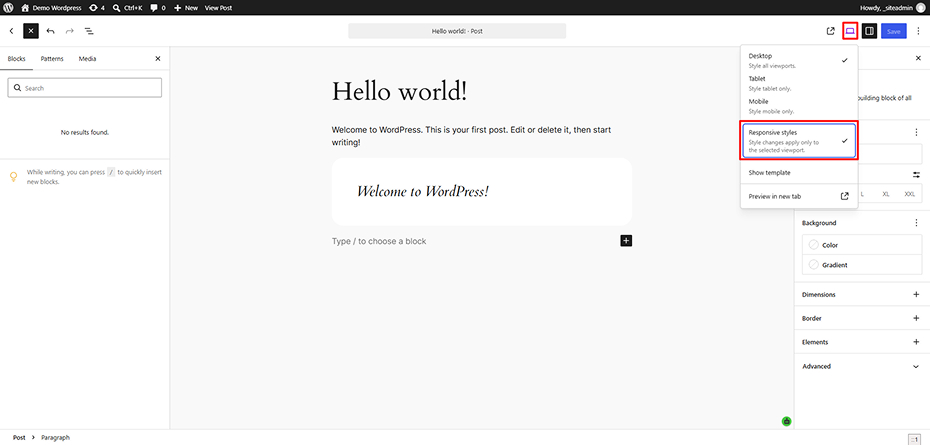
This is arguably the most requested block editor feature to date. From the device preview icon in the top toolbar, you can now turn on Responsive Styles and apply different design choices – font size, spacing, layout – for Desktop, Tablet, and Mobile independently, without touching a line of CSS.
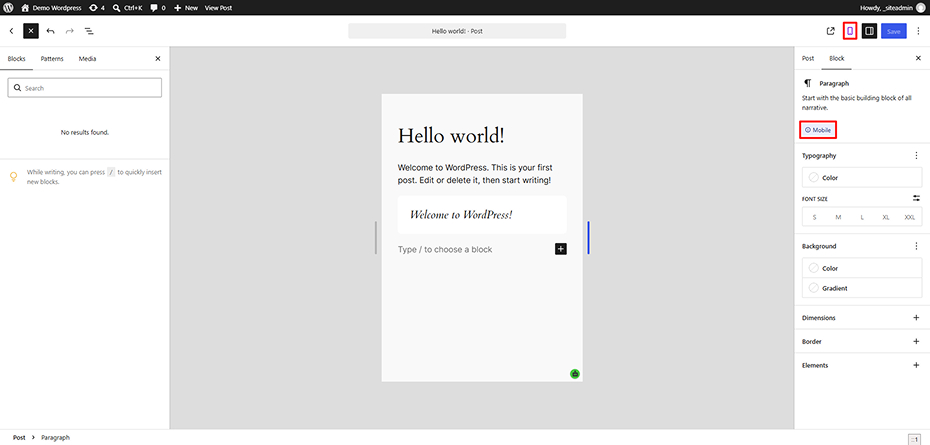
Styles can be set globally (Global Styles) or on an individual block per page, and the canvas can now be dragged to any custom width to preview breakpoints in real time. Theme developers can also register their own custom breakpoints through theme.json.
4. Style Hover and Focus States for Buttons
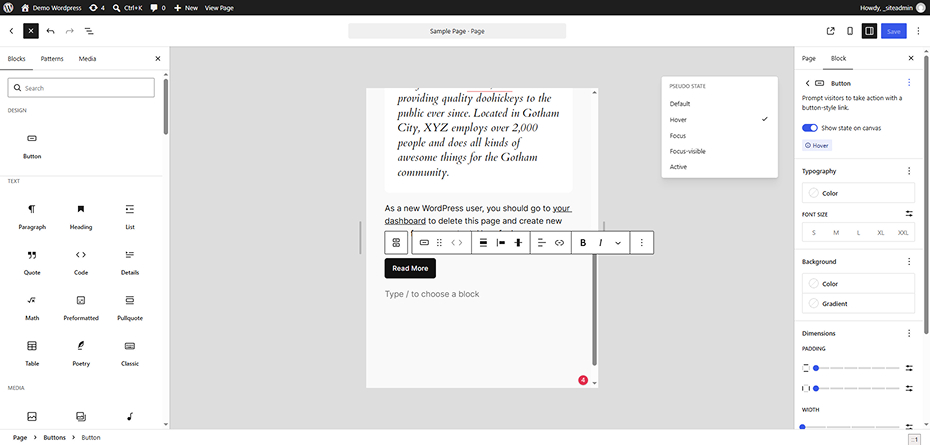
A new State dropdown lets you visually design how blocks respond to interaction – hover, focus, and active states – directly in the editor, with a live preview. Previously this required a custom CSS snippet.
5. New Tabs Block
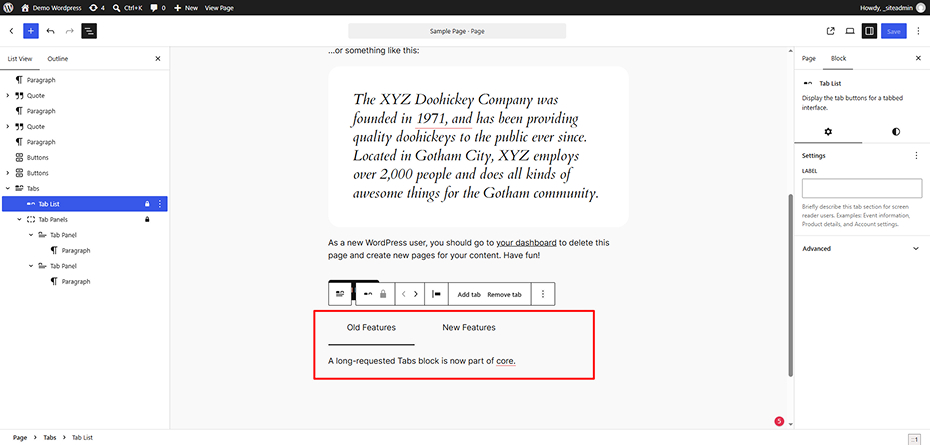
A long-requested Tabs block is now part of core. It organizes content into clickable panels – ideal for FAQs, product specifications, or side-by-side comparisons – and follows the W3C ARIA Authoring Practices Guide for accessibility, meaning it works correctly with keyboards and screen readers out of the box.
6. New Playlist Block
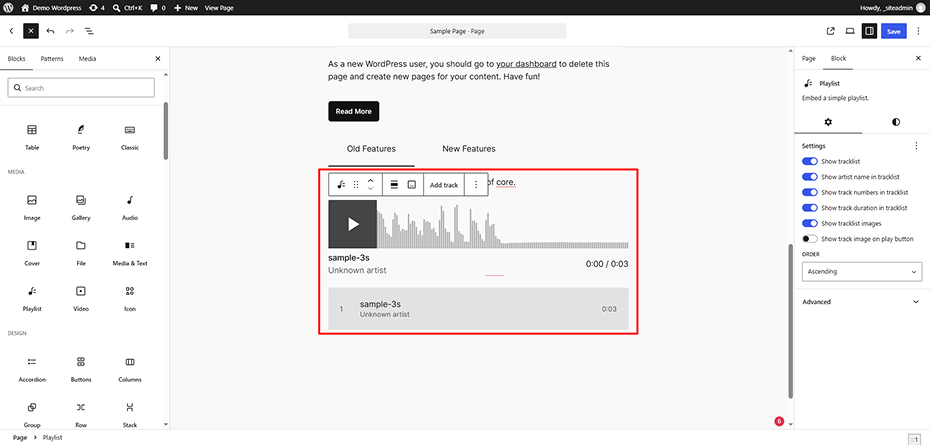
The new Playlist block lets you embed a collection of audio files complete with track metadata, artwork, and a waveform visualization – useful for podcasters, musicians, churches, and educators who previously needed a separate plugin.
7. A New Media Editor
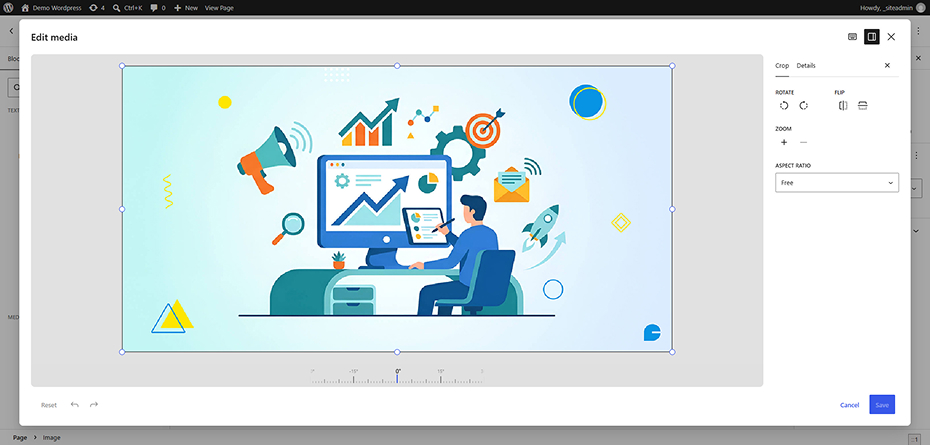
The old inline image-cropping tool has been replaced with a dedicated Media Editor modal offering freeform cropping, aspect-ratio presets, flip/rotate controls, and metadata editing in one place. It also works with the Cover block, so background images can be cropped where they’re used.
Also Read: Custom Code vs. Plugins: Which Is Better for Your Website?
8. Smarter, More Resilient Media Uploads
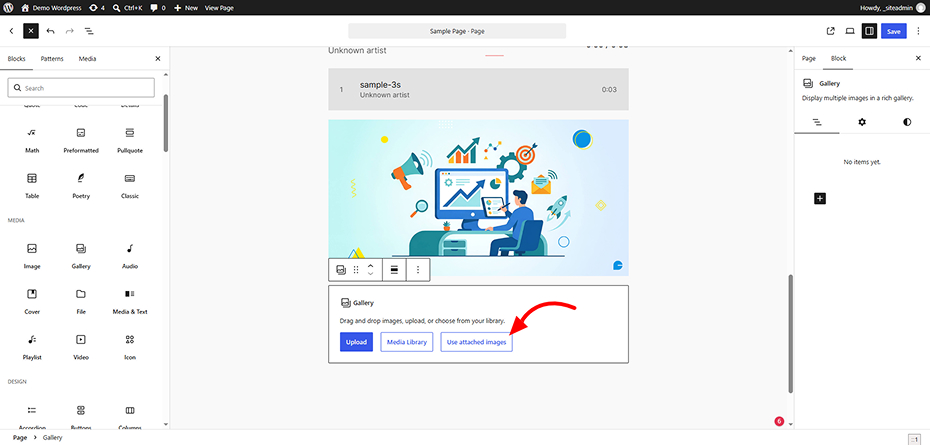
WordPress 7.1 expands format support to include HEIC (the default iPhone photo format), UltraHDR, AVIF, and WebP, largely eliminating the need for third-party HEIC conversion plugins. Uploads are also more resilient: if a connection drops mid-upload, the queue automatically pauses and resumes. Additional improvements include a smarter dynamic Gallery mode, an “Attached images” section in the block inserter, and infinite scrolling in the Media Library grid (on by default, with an opt-out).
9. Persistent Admin Toolbar & Navigation Upgrades
The admin toolbar now stays visible inside the Post and Site Editors instead of disappearing while you edit. Alongside this, the toolbar gets a design cleanup – a clear back button, your site icon in the toolbar, a circular profile avatar, and modern SVG icons replacing the old Dashicons.
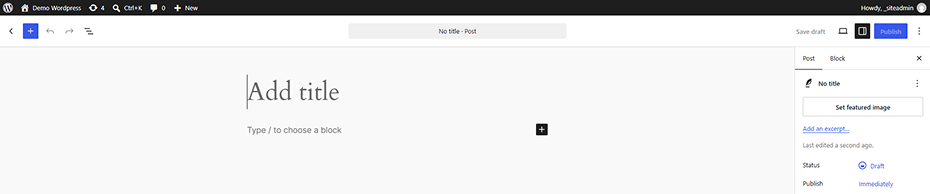
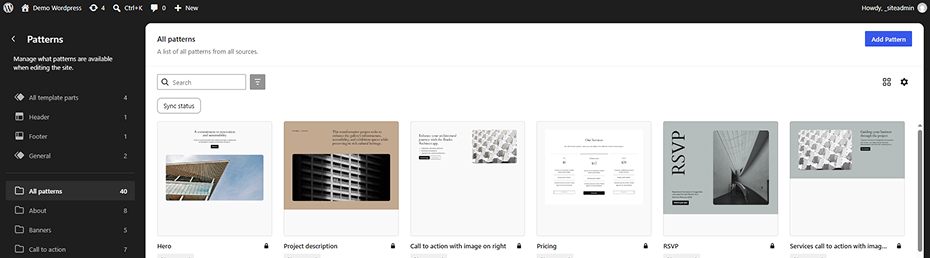
Other admin refinements include a redesigned Command Palette (Ctrl/Cmd+K) with Recent, Matching, and Suggestions sections, a Site Editor that now respects your chosen admin color scheme, a dedicated Design → Identity section for managing your site title, tagline, logo, and icon, post-list excerpts, shift-click range selection in list views, and an editable “In reply to” field for comments.
New Features for Developers
1. Client-Side Media Processing
WordPress 7.1 shifts image resizing, format conversion, EXIF rotation, and thumbnail generation from server-side PHP (using GD or Imagick) to the user’s browser, using the new @wordpress/vips package (a WebAssembly build of the libvips library) running inside a Web Worker. This is managed through three core packages – @wordpress/vips, @wordpress/upload-media, and @wordpress/media-utils – and introduces new REST API endpoints (sideload, finalize, replace_file). This results in fewer PHP memory errors, lower server CPU and RAM usage, and smaller image files. Using libvips reduces image sizes by around 15% on average. It also improves security by removing the need for GD/Imagick. Developers can disable it entirely with the wp_client_side_media_processing_enabled filter. The full pipeline currently requires Chrome 137+ or Edge 137+. Safari and Firefox do not support the WASM pipeline yet, while Safari supports native HEIC decoding.
2. Abilities API Expansion (Built for AI Agents)
The Abilities API, introduced in WordPress 6.9 as a machine-readable registry of site capabilities, gets significant upgrades in 7.1: four new execution lifecycle filters (wp_pre_execute_ability, wp_ability_normalize_input, wp_ability_permission_result, wp_ability_execute_result), improved filtering through wp_get_abilities() (by category, namespace, or metadata), and a new unified meta.public flag that lets developers expose an ability to REST clients, MCP adapters, and AI agents without configuring each channel separately. This is core plumbing for sites that want to safely connect with AI tools and agents.
3. Public Icons API
Icons can now be registered, rendered, and deleted programmatically, and fetched through new REST endpoints (/wp/v2/icons, /wp/v2/icon-collections). Functions like wp_register_icon_collection(), wp_register_icon(), and wp_get_icon() let plugin and theme developers ship their own branded icon libraries, with SVGs sanitized against a strict allowlist.
4. Design System Theming
A new design token system (CSS custom properties following a --wpds-color-<property>-<target>-<tone> pattern) plus a React ThemeProvider component let plugin developers style admin interfaces consistently with WordPress core while expressing their own brand identity.
5. Other Developer Changes
- The block editor canvas now always uses an iframe, even for legacy meta boxes. This improves style isolation, while Block API v3 ensures full compatibility.
- jQuery UI updated to 1.14.2 – test older plugins that rely on it before updating on production.
- Multisite upload quotas now apply to sideloaded media (imported from a URL), closing a previous loophole.
- Background gradient support,
minWidth dimension controls, and text-shadow support in Global Styles give theme developers more design flexibility through theme.json.
- You can now add editable blocks inside the Custom HTML block, making it easier to combine static HTML with AI-generated layouts.
What Didn’t Make It Into WordPress 7.1
A few previewed features were held back:
- The “On This Day” dashboard widget was cut for further development.
- Real-time, Google Docs-style co-editing is still being tested for conflict handling and remains available early in the Gutenberg plugin.
- The Classic block stays in the inserter – plans to hide it were reversed after community feedback.
- Unicode email address support was pulled during beta and continues development as a community plugin.
Also Read: Comparing Top WordPress Hosting Providers in 2026
Should You Update? A Pre-Update Checklist
Most sites can update without issues, but larger or plugin-heavy sites should check the following first:
- Back up your entire site before updating – database and files.
- Test older plugins that rely on jQuery UI or add custom scripts/styles to the editor, since the now-fully-iframed editor may affect compatibility.
- Confirm Block API v3 compliance for any custom blocks.
- Review multisite storage quotas if you run a network with plugins that sideload media from URLs.
- Test on staging first if you run a large, plugin-heavy, or agency-managed site.
Skip the risk of a broken update. Let our Website Maintenance & Optimization team handle backups, staging tests, and the WordPress 7.1 rollout for you.
FAQs
1. When was WordPress 7.1 released?
WordPress 7.1 was released on August 19, 2026.
2. What is the biggest new feature in WordPress 7.1?
There isn’t a single standout feature – the release focuses on collaboration (upgraded Notes), design (responsive styling without CSS), and performance (client-side media processing). Most reviewers point to responsive styling and Notes as the most impactful additions for everyday users.
3. Does WordPress 7.1 support HEIC images from iPhones?
Yes. WordPress 7.1 adds native support for HEIC, UltraHDR, AVIF, and WebP formats, reducing the need for third-party conversion plugins.
4. Is WordPress 7.1 safe to update to immediately?
For most standard sites, yes. Larger sites with older plugins, custom meta boxes, or heavy jQuery UI dependencies should back up and test on staging first, since the editor is now always iframed and jQuery UI has been updated.
5. What is the Abilities API in WordPress 7.1?
It’s a machine-readable registry of a site’s capabilities that lets AI agents, tools, and the REST API interact with WordPress in a structured, permission-controlled way. WordPress 7.1 expands it with new lifecycle filters and a unified public exposure flag.
6. Does WordPress 7.1 require any special hosting?
No special hosting is required, but client-side media processing works best in Chrome 137+ and Edge 137+. Reliable, well-configured hosting still matters for overall site performance and update stability.
Final Thoughts
WordPress 7.1 doesn’t chase headlines – it fixes real, everyday friction for editors, designers, and developers alike. If you manage a WordPress site, this release is worth prioritizing, especially if your team collaborates on content or you’ve been waiting for responsive design controls without custom code.
If you’re not confident about updating a live, business-critical site – or you want to make sure your theme, plugins, and custom blocks are fully compatible with WordPress 7.1 before you update – our WordPress development team can handle the update, compatibility testing, and ongoing maintenance for you.
Not sure if your theme and plugins are WordPress 7.1 ready? Our team can test, update, and maintain your site so you never fall behind on core releases. Explore our WordPress Development Services now.
Author
Jayesh Patel
Jayesh Patel is a Professional Web Developer & Designer and the Founder of InCreativeWeb.
As a highly Creative Web/Graphic/UI Designer - Front End / PHP / WordPress / Shopify Developer, with 14+ years of experience, he also provide complete solution from SEO to Digital Marketing. The passion he has for his work, his dedication, and ability to make quick, decisive decisions set him apart from the rest.
His first priority is to create a website with Complete SEO + Speed Up + WordPress Security Code of standards.